The Trick That's Fooling Millions - What is ClickFix and How to Stay Safe
- David Miller
- March 8, 2026
- 3 mins
- Malware
- malware security viruses
You don’t need to be a cybersecurity expert to fall for ClickFix. In fact, it’s designed to fool everyone — including smart, careful people. Here’s what you need to know.
It Starts with a Fake Problem
Imagine you’re browsing the web and suddenly a pop-up appears. It looks official. It might say:
- “Your browser needs an update to view this page.”
- “Complete this verification to prove you’re not a robot.”
- “A problem was detected. Click here to fix it.”
These messages feel routine. We’ve all seen them. That’s exactly why ClickFix works so well.
What Actually Happens
Once you click “Fix It” or follow the on-screen instructions, here’s the trap:
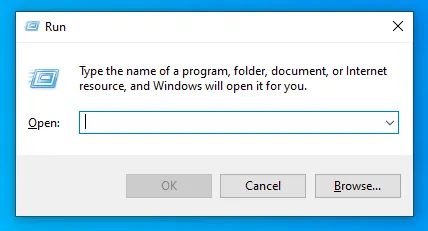
- A hidden command is silently copied to your clipboard — that’s the area on your computer that holds anything you’ve recently copied.
- You’re told to press a keyboard shortcut (usually
Windows + R) to open a small box on your screen. - You paste and press Enter — and just like that, a malicious program runs on your computer, without you ever downloading a file.
That’s it. No suspicious attachment. No obvious warning signs. You did everything yourself, which is why your antivirus didn’t stop it.
Why It’s So Dangerous
ClickFix isn’t a rare, niche threat. According to Microsoft’s 2025 security research, it became the number one way hackers break into computers — ahead of traditional phishing emails. It’s been used to steal passwords, bank details, and personal files from everyday users and large companies alike. Even government agencies have been targeted.
What makes it especially sneaky is that you are the one who runs the harmful command. Security software is built to block automatic attacks — but it can’t stop you from typing something yourself.
How to Stay Safe
The good news is that protecting yourself is simple once you know the warning signs.
🚨 The golden rule: No legitimate website will ever ask you to copy and paste a command into your computer.
If a webpage ever instructs you to:
- Press
Windows + R - Open “PowerShell” or “Terminal”
- Paste anything from your clipboard and press Enter
Stop immediately and close the tab. It doesn’t matter how real the page looks.
Here are a few more tips to keep you safe:
- Be suspicious of urgency. Fake prompts often say things like “act now” or “your device is at risk.”
- When in doubt, Google it. Search the exact message you’re seeing to find out if it’s a known scam.
- Keep your real software updated. Install updates through your device’s settings, not through a random webpage pop-up.
- Tell someone. If you saw this at work, let your IT team know — even if you didn’t click anything.
The Bottom Line
ClickFix is clever because it doesn’t hack your computer — it tricks you into doing it. Now that you know how it works, you’re already far less likely to fall for it. Stay curious, stay skeptical, and remember: if a website asks you to run a command, it’s a scam.
Stay safe out there. Share this with someone who might need it.